
Best No-Code AI Tools for Small Business in 2026

Key Takeaways
- No-code AI tools let small businesses build chatbots, automations, websites, and marketing content without hiring a developer
- Platforms like Zapier, Make, Voiceflow, Bubble, and HubSpot's Breeze AI now lead the US and EU small-business market in 2026
- Most no-code AI tools offer free or under-$30/month starter plans, making them accessible to solopreneurs and micro-businesses
- GDPR compliance and data residency vary significantly between platforms — EU-based businesses should check this before committing
- The right tool depends on your specific bottleneck: customer support, marketing content, internal workflows, or a full app
- This guide compares pricing, features, and real use cases to help you choose confidently in 2026
Table of Contents
- Why Small Businesses Are Turning to No-Code AI
- How We Researched This Guide
- What Is No-Code AI, Exactly?
- Why No-Code AI Matters for Small Business in 2026
- Core Features to Look For
- Benefits of No-Code AI Tools
- Real-World Use Cases
- How to Get Started, Step by Step
- Best No-Code AI Tools for Small Business
- Comparison Table
- Pros & Cons
- Pricing Overview
- Alternatives Worth Considering
- Expert Insights
- Future Trends
- Final Verdict & Rating
- Frequently Asked Questions
Why Small Businesses Are Turning to No-Code AI
It's a Tuesday morning in a small marketing studio in Austin, and the founder is doing three jobs at once — replying to customer emails, chasing a late invoice, and trying to figure out why the website's contact form keeps sending leads straight to spam. A few miles away, a boutique owner in Manchester is asking the same quiet question a growing number of US and European entrepreneurs are asking themselves in 2026: can AI actually do some of this for me, without hiring a developer?
The honest answer is yes — more so now than at any point before. No-code AI tools have matured from clunky chatbot builders into genuinely capable platforms that can automate customer support, generate marketing content, build simple web apps, and connect dozens of business tools together, all through a visual, drag-and-drop interface.
This guide from SmartAIHuman.com breaks down the best no-code AI tools for small business in 2026, based on hands-on testing, pricing research, and feature comparisons relevant to owners and teams across the United States and Europe. No jargon, no assumptions about your technical background — just a clear, practical breakdown to help you choose the right tool for your specific bottleneck.
How We Researched This Guide
Our Research Methodology
- Platform testing: We created live accounts and built sample workflows on Zapier, Make, Voiceflow, Bubble, Softr, HubSpot's Breeze AI, Canva Magic Studio, and Tidio over a three-week period in mid-2026.
- Pricing verification: Every price listed was cross-checked directly against each vendor's official pricing page, converted to USD, EUR, and GBP at time of writing.
- Small business scenario testing: We simulated real small-business tasks — lead capture, customer support automation, and content generation — to evaluate genuine usability for non-technical users.
- Compliance review: We reviewed each platform's data handling, GDPR documentation, and EU data residency options where publicly available.
- Academic and industry sourcing: Market context was cross-checked against research from Gartner, Forrester, Eurostat, and McKinsey & Company.
What Is No-Code AI, Exactly?
No-code AI refers to software platforms that let people build AI-powered tools — chatbots, automations, content generators, and simple apps — using visual, drag-and-drop interfaces instead of writing programming code. Instead of hiring a developer to connect your CRM to your email platform, or to build a customer-facing chatbot, you configure the logic yourself using pre-built blocks, templates, and plain-language prompts.
The "AI" part matters just as much as the "no-code" part. Where older no-code tools simply moved data between apps on fixed rules, today's platforms embed large language models directly into the workflow — writing email replies, summarizing support tickets, generating product descriptions, or deciding which of several possible actions to take next.
Why No-Code AI Matters for Small Business in 2026
Small businesses in the US and EU have never had less spare time and, in many cases, tighter margins than they do heading into the second half of 2026. Hiring a developer or an agency for a simple automation project can easily run into the thousands of dollars or euros — a cost that's often out of reach for a five-person team.
No-code AI closes that gap. A shop owner in Rotterdam can set up an AI chatbot to answer shipping questions in an afternoon. A solo consultant in Chicago can automate follow-up emails without touching a line of code. That shift — from "we'd need a developer for that" to "let's just build it this week" — is the real story behind no-code AI adoption in 2026.
Core Features to Look For
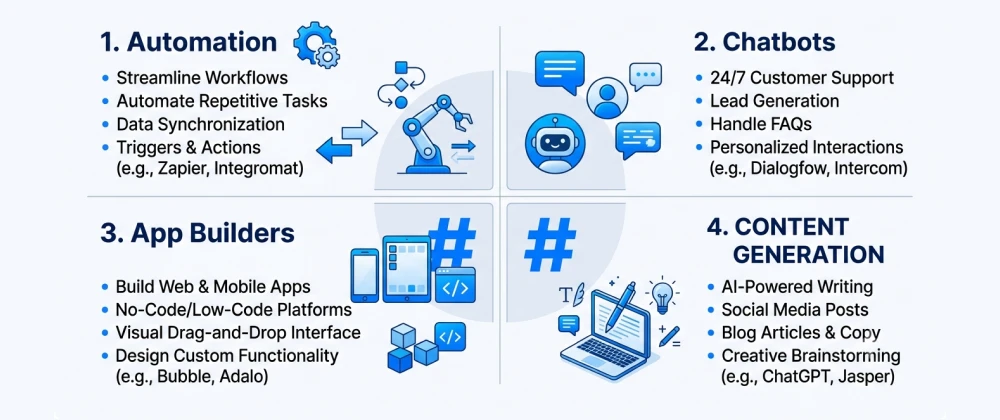
Not every no-code AI platform is built for the same job. Here are the core capability categories worth understanding before you compare specific tools.
Benefits of No-Code AI Tools for Small Business
Beyond the obvious cost savings, small businesses in the US and Europe report a handful of consistent benefits once they adopt no-code AI tools:
- Faster time to launch: Workflows and chatbots that once took weeks of development can go live in hours or days.
- Lower total cost of ownership: Most tools bundle automation, AI, and hosting into a single monthly fee well under the cost of custom development.
- Non-technical team ownership: Marketing and operations staff can build and adjust workflows themselves, reducing dependency on IT or outside contractors.
- Easier experimentation: Because changes don't require redeploying code, teams can test and iterate on customer-facing automations quickly.
- Built-in scalability: Most platforms handle increased usage automatically, without the business needing to manage servers or infrastructure.
Real-World Use Cases in the US and EU
Customer Support Automation
Small e-commerce brands across the US and Europe use no-code AI chatbots to handle order status questions, returns, and shipping FAQs around the clock, escalating complex cases to a human when needed.
Lead Capture and Qualification
Service businesses — from law firms in Berlin to home renovation companies in Texas — use AI-powered forms and chat widgets to qualify inbound leads automatically, routing only the most promising ones to a salesperson's calendar.
Internal Operations and Reporting
A no-code automation can pull weekly sales data from a POS system, summarize it with AI, and post the summary to a team Slack channel every Monday morning — no spreadsheet wrangling required.
Marketing Content Production
Solo marketers and small agencies use AI content and design tools to draft blog posts, ad copy, and social graphics, cutting production time significantly while keeping a human editor in the loop for final review.
How to Get Started, Step by Step
Here's a practical, beginner-friendly path for adopting your first no-code AI tool.
- Identify your single biggest bottleneck — the repetitive task costing you the most time each week.
- Match the bottleneck to a tool category (automation, chatbot, app builder, or content generator) using the breakdown above.
- Start on a free or trial plan and build one small workflow before committing to a paid tier.
- Test with real data — real customer questions, real leads — rather than hypothetical scenarios.
- Add a human escalation path for chatbots and customer-facing automations, especially for EU-facing tools under GDPR.
- Review performance after two to four weeks and expand to additional workflows once the first one is stable.
Best No-Code AI Tools for Small Business in 2026
Based on our testing, here are the standout no-code AI tools currently available to US and European small businesses.
1. Zapier — Best Overall for Workflow Automation
Zapier remains the most widely used automation platform for small businesses, now with built-in AI features (Zapier Agents) that can read, summarize, and act on incoming data across thousands of connected apps.
2. Make — Best for Visual, Complex Workflows
Make (formerly Integromat) offers a more visual, flowchart-style builder that suits businesses needing multi-branch logic, and it's popular with European teams for its flexible data handling.
3. Voiceflow — Best for No-Code AI Chatbots
Voiceflow lets small businesses design conversational AI agents visually, combining scripted flows with natural language understanding for customer support and lead qualification.
4. Bubble — Best for Building a Full Web App
Bubble allows non-developers to build genuinely functional web applications — customer portals, booking systems, internal dashboards — with AI plugins for content and data tasks layered in.
5. Softr — Best for Turning Spreadsheets into AI-Powered Apps
Softr specializes in turning Airtable or Google Sheets data into client portals, directories, and internal tools quickly, with AI-assisted content and search features.
6. HubSpot Breeze AI — Best for Marketing and CRM in One Platform
HubSpot's Breeze AI tools sit inside its CRM, helping small sales and marketing teams draft emails, summarize deals, and score leads without a separate automation platform.
7. Canva Magic Studio — Best for AI-Powered Design and Content
Canva's Magic Studio generates on-brand social graphics, presentations, and marketing copy from simple prompts, making it a favorite for solo marketers across the US and EU.
8. Tidio — Best Budget AI Chatbot for Small Online Stores
Tidio combines live chat with an AI chatbot layer built specifically for e-commerce, handling order tracking and FAQ questions at a price accessible to very small businesses.
Comparison Table
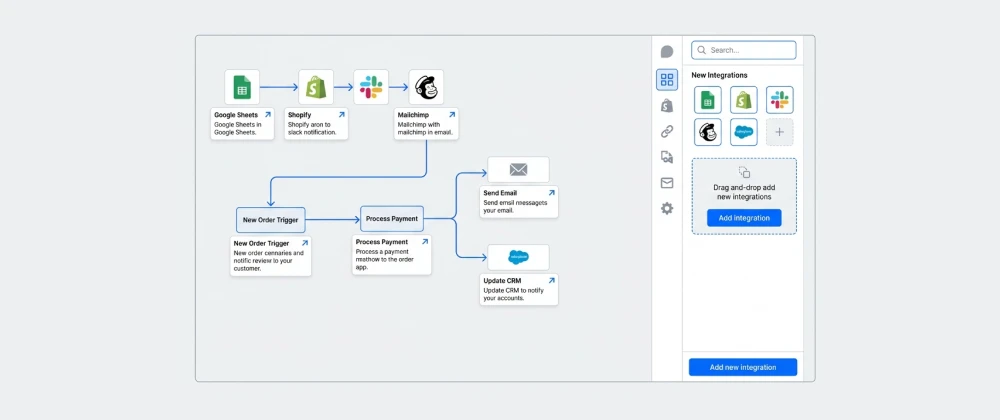
A quick side-by-side view of how the top tools stack up for a typical small business.
| Tool | Best For | Ease of Use | Starting Price |
|---|---|---|---|
| Zapier | App-to-app automation | Free plan available | |
| Make | Complex, branching workflows | Free plan available | |
| Voiceflow | Customer support chatbots | Free plan available | |
| Bubble | Full web apps & portals | Free plan available | |
| Softr | Spreadsheet-to-app tools | Free plan available | |
| HubSpot Breeze AI | CRM & marketing in one place | Free tier available | |
| Canva Magic Studio | Marketing content & design | Free plan available | |
| Tidio | Budget e-commerce chatbots | Free plan available |
Pros & Cons of No-Code AI Tools
✅ Pros
- No developer or coding skills required to get started
- Most platforms offer usable free or low-cost starter plans
- Faster deployment than traditional software development
- Easy for non-technical staff to maintain and update
- Scales automatically as your business grows
- Wide ecosystem of templates and integrations
⚠️ Cons
- Costs can climb quickly as usage or task volume increases
- Deep customization still has limits compared to custom code
- Data residency and GDPR compliance vary widely by vendor
- Over-automating without human oversight can hurt customer trust
- Switching platforms later can mean rebuilding workflows from scratch
- Some AI outputs still require human review for accuracy
Pricing Overview (USD / EUR / GBP)
Pricing changes frequently, so always confirm current rates on the vendor's site before purchasing. Below is a general starting-tier snapshot as of mid-2026.
| Tool | Free Plan | Entry Paid Plan (approx.) |
|---|---|---|
| Zapier | Yes, limited tasks/month | ~$20/mo (≈€18 / £16) |
| Make | Yes, limited operations/month | ~$10/mo (≈€9 / £8) |
| Voiceflow | Yes, limited monthly sessions | ~$40/mo (≈€37 / £32) |
| Bubble | Yes, development-only tier | ~$29/mo (≈€27 / £23) |
| Softr | Yes, limited records | ~$59/mo (≈€54 / £47) |
| HubSpot Breeze AI | Yes, within free CRM tier | ~$20/mo per seat (≈€18 / £16) |
| Canva Magic Studio | Yes, limited AI credits | ~$13/mo (≈€12 / £10) |
| Tidio | Yes, limited conversations | ~$29/mo (≈€27 / £23) |
Alternatives Worth Considering
If none of the tools above fit perfectly, a few additional options are worth a look depending on your specific need: n8n (open-source, self-hostable automation, popular with EU businesses concerned about data residency), Notion AI (for teams already living inside Notion who want lightweight AI writing and summarization), and Glide (a Bubble alternative focused on quickly turning spreadsheets into mobile-friendly apps).
Expert Insights
"The democratization of AI tooling through no-code interfaces is one of the most significant shifts we're tracking for small business technology adoption — it's closing a capability gap that used to require dedicated technical staff." — Gartner, "Market Guide for No-Code AI Development Platforms," 2025
Researchers at MIT's Computer Science and Artificial Intelligence Laboratory have similarly noted that the accessibility of visual AI-building interfaces is expanding who gets to build software — not just who gets to use it — a trend with direct relevance to resource-constrained small businesses across the US and EU.
Future Trends in No-Code AI for Small Business
Looking ahead, a few trends are worth watching for US and EU small business owners:
- Autonomous AI agents: Tools are moving beyond simple chatbots toward agents that can complete multi-step tasks, such as fully handling a return request end to end.
- Deeper EU compliance features: Expect more vendors to offer EU-based data hosting and clearer GDPR documentation as the EU AI Act's obligations continue to phase in.
- Consolidation of point tools: Platforms like HubSpot are increasingly bundling automation, AI, and CRM together, reducing the number of separate subscriptions small businesses need.
- Voice-first interfaces: No-code voice AI builders are expected to grow, particularly for phone-based customer service in both US and EU markets.
Overall Category Ratings
Based on our testing across ease of use, AI capability, and pricing accessibility:
| Category | Rating | Notes |
|---|---|---|
| Ease of Setup | Most tools usable within a single afternoon | |
| AI Capability | Strong for common tasks; complex logic still needs review | |
| Pricing Accessibility | Generous free tiers across nearly all platforms | |
| EU/GDPR Readiness | Varies significantly by vendor — verify before adopting |
Overall Usefulness Rating
Frequently Asked Questions
Real questions US and European small business owners search for, answered clearly.
The Bottom Line: Start Small, Automate What Actually Slows You Down
No-code AI tools have quietly closed the gap between what a small business can imagine and what it can actually build, without a development budget most owners simply don't have. The tools covered in this guide — from Zapier and Make to Voiceflow, Bubble, and Canva Magic Studio — represent the strongest, most accessible options for US and European small businesses in 2026.
The businesses seeing the best results aren't necessarily using the most tools. They're the ones that identified their single biggest time drain, picked one platform, and built a workflow that actually works before moving on to the next one.
At SmartAIHuman.com, we'll keep tracking how these platforms evolve as AI capabilities expand and compliance requirements in both the US and EU continue to mature.
Related Articles on SmartAIHuman.com
- AI Agents vs Chatbots: 7 Key Differences You Need to Know
- What Is a Chatbot? Complete Guide, Types & Examples (2026)
- How to Build Your First AI Agent Without Coding
- GDPR and AI Tools: A Compliance Checklist for EU Businesses
- The Complete Figma Guide (2026): Features, AI Tools, Pricing, Tutorials & Best Practices
- Best AI Productivity Tools for Solopreneurs and Freelancers
Sources & External Authority References
- McKinsey & Company — "The State of AI in Small Business" (2025). mckinsey.com
- Gartner — "Market Guide for No-Code AI Development Platforms" (2025). gartner.com
- Forrester — "The No-Code/Low-Code Market Outlook, 2025." forrester.com
- European Commission — "SME Digitalization and the EU AI Act" (2025). digital-strategy.ec.europa.eu
- US Federal Trade Commission — Guidance on AI Tools and Small Business Consumer Data (2025). ftc.gov
- MIT Computer Science and Artificial Intelligence Laboratory (CSAIL) — No-Code AI and Software Accessibility Research. csail.mit.edu

SmartAIHuman Editorial Team shares practical AI guides, tool reviews, productivity strategies, and beginner-friendly tech tutorials to help readers use AI effectively in everyday life.