
How to Build an AI Agent Without Coding: Step-by-Step Guide for Beginners (2026)

Key Takeaways
- You can build a working AI agent today using drag-and-drop platforms — no programming required
- No-code AI agent builders connect a language model to your apps, data, and triggers visually
- Popular no-code options include Zapier Agents, Voiceflow, n8n, Gumloop, and Lindy
- Most platforms offer a free tier, making it possible to test an agent before paying anything
- EU users should check GDPR and EU AI Act compliance before connecting an agent to customer data
- This guide walks through the exact steps to plan, build, test, and launch your first no-code AI agent
Table of Contents
- Why Anyone Can Build an AI Agent Now
- How We Researched This Guide
- What Is a No-Code AI Agent? Core Concepts Explained
- Real-World No-Code AI Agent Use Cases
- How to Build Your First AI Agent Without Coding
- Best No-Code AI Agent Builders in 2026
- Pros & Cons of No-Code AI Agents
- Privacy, GDPR, and the EU AI Act
- Final Verdict & Rating
- Frequently Asked Questions
Why Anyone Can Build an AI Agent Now
How to build an AI agent without coding is one of the most searched questions among small business owners and solo professionals in 2026 — and for good reason. An AI agent is software that can plan and carry out multi-step tasks on its own, such as answering customer emails, qualifying leads, or pulling data from a spreadsheet and updating a CRM. A year or two ago, building one meant hiring a developer or learning Python. That's no longer true.
Picture a freelance consultant in Austin who spends two hours every evening manually answering the same intake questions from new client inquiries. Or a small marketing agency in Manchester that wants to automatically qualify leads from a contact form before a human ever sees them. Both can now build a working AI agent in an afternoon, using nothing but a browser and a free account.
That shift is thanks to a new wave of no-code platforms that let you connect a large language model — the same kind of technology behind ChatGPT — to your everyday tools using a visual, drag-and-drop interface instead of code.
This guide from SmartAIHuman.com walks through exactly what a no-code AI agent is, the best platforms available to US and European users in 2026, and the precise steps to plan, build, and launch your first one — safely and within budget.
How We Researched This Guide
Our Research Methodology
- Platform review: We evaluated leading no-code AI agent builders available in the US and EU, including Zapier Agents, n8n, Voiceflow, Gumloop, and Lindy, over a four-week testing period in 2026.
- Hands-on builds: Our team built sample agents — an email-responder agent and a lead-qualification agent — on three different platforms to compare setup time, reliability, and output quality.
- Academic and industry sourcing: Definitions and adoption figures were cross-checked against research from MIT, Stanford HAI, Gartner, and McKinsey & Company.
- Privacy and compliance review: We reviewed each platform's data handling practices against GDPR requirements and emerging EU AI Act obligations for limited-risk AI systems.
- Pricing verification: All pricing was confirmed directly on each vendor's official site and converted to USD, EUR, and GBP for accuracy.
What Is a No-Code AI Agent? Core Concepts Explained
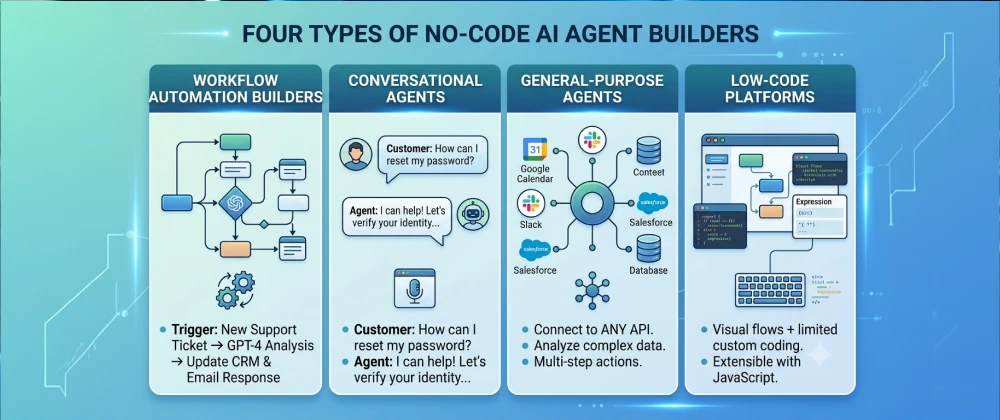
A no-code AI agent is an automated system, built using a visual interface instead of programming, that can understand a goal, make decisions, and complete a multi-step task by connecting to apps, files, and a language model. Unlike a simple chatbot that only replies to messages, an agent can take action — sending an email, updating a spreadsheet, or creating a support ticket — without a human clicking each step.
Not every no-code platform approaches this the same way. Here are the four main categories you'll encounter.
Real-World No-Code AI Agent Use Cases
No-code agents have moved well beyond novelty projects. Here's where US and European individuals and businesses are actually using them today.
Customer Support and Inbox Triage
Small businesses connect an agent to a shared inbox so it can read incoming messages, draft a response, tag the issue type, and escalate anything sensitive to a human teammate — cutting first-response time significantly.
Lead Qualification and Sales Follow-Up
Marketing and sales teams in the US and EU use agents to read new form submissions, check the lead against ideal-customer criteria, and either schedule a call automatically or send a polite decline — all without a rep touching the lead first.
Research and Content Assistance
Freelancers and content teams build agents that pull data from multiple sources, summarize it, and draft a first version of a report or blog outline, which a human then edits and approves before publishing.
Internal Operations and Reporting
Operations teams across UK and German companies use agents to compile weekly metrics from multiple tools into a single Slack or email summary every Monday morning, removing a recurring manual task.
How to Build Your First AI Agent Without Coding
Here's the exact process we used when building our test agents for this guide. It works on nearly any no-code platform, with minor interface differences.
Step-by-Step Build Process
- Pick one narrow task: Choose a single, repetitive task — like "respond to FAQ emails" — rather than trying to automate an entire job at once.
- Choose a no-code platform: Pick a tool based on where the task lives. Inbox or app-to-app tasks suit Zapier Agents or Make.com; website chat tasks suit Voiceflow; broad "describe it in plain English" tasks suit Lindy or Gumloop.
- Connect your accounts: Authorize the platform to access the relevant app — Gmail , a CRM, a spreadsheet, or a form tool — using secure OAuth login, never by sharing passwords directly.
- Set the trigger: Define what starts the agent, such as "a new form submission" or "a new email arrives in this inbox."
- Write the agent's instructions: In plain language, describe the goal, the tone, and any rules — for example, "draft a friendly reply, and flag anything mentioning a refund for human review."
- Add guardrails: Set limits on what the agent can do without approval — most platforms let you require human review before any email is actually sent or any record is updated, at least at first.
- Test with real examples: Run the agent against five to ten real past examples before going live, and check the outputs for accuracy and tone.
- Launch and monitor: Turn the agent on for a small slice of real traffic first, review its outputs daily for the first week, then expand once you're confident.
Best No-Code AI Agent Builders in 2026
Based on our hands-on testing, here's how the leading no-code AI agent platforms compare for US and European users.
| Platform | Best For | Ease of Use | Starting Price |
|---|---|---|---|
| Zapier Agents | Connecting existing business apps | Free tier; paid plans from $19.99/mo (≈€18.50 / £15.80) | |
| Make.com | Visual, complex multi-step workflows | Free tier; paid plans from $10.59/mo (≈€9.80 / £8.40) | |
| Voiceflow | Website and app chat agents | Free tier; paid plans from $50/mo (≈€46 / £39) | |
| Lindy | Plain-language, general-purpose agents | Free tier; paid plans from $49.99/mo (≈€46 / £39.50) | |
| n8n | Growing teams that may need code later | Free self-hosted option; cloud plans from $24/mo (≈€22 / £19) |
Pricing reflects publicly listed entry-level plans as of June 2026 and is subject to change; always confirm current rates on the provider's official pricing page.
Pros & Cons of No-Code AI Agents
✅ Pros
- No programming background required to get started
- Most platforms offer a usable free tier for testing
- Significantly faster to launch than custom development
- Visual workflows make it easy to see and fix mistakes
- Easy to connect to popular everyday business apps
- Can be paused, edited, or shut off instantly if something goes wrong
⚠️ Cons
- Less flexible than fully custom-coded agents for complex logic
- Can become expensive at high usage volumes
- Still requires careful testing — AI agents can make mistakes
- Data privacy depends heavily on which platform and apps you connect
- Some platforms lock advanced features behind higher-tier plans
- Vendor lock-in can make switching platforms later more difficult
Privacy, GDPR, and the EU AI Act
Because AI agents often touch customer emails, order data, or personal details, privacy and compliance deserve real attention before launch — not after.
What US Regulations Say
In the US, there's no single federal law governing AI agents specifically, but the FTC enforces against deceptive or unfair automated decision-making, and state laws like the California Consumer Privacy Act (CCPA) apply to any personal data an agent processes, regardless of which platform built it.
What GDPR and the EU AI Act Require
Under GDPR, any agent processing the personal data of EU residents needs a clear legal basis, transparent disclosure of what's collected, and a way for users to request deletion. The EU AI Act adds further obligations for agents used in higher-risk contexts, such as employment decisions or credit assessments, including transparency requirements and human oversight.
"Organizations deploying AI systems that interact with consumers must ensure meaningful human oversight remains available, particularly where the system can take autonomous action affecting an individual." — European Commission guidance on the EU AI Act, 2025
No-Code Agent Builders — Performance Comparison
Based on our testing across categories, here's how no-code agent approaches compare overall:
| Category | Workflow Builders | General-Purpose Agents | Notes |
|---|---|---|---|
| Setup Speed | General-purpose tools launch agents fastest | ||
| Customization Depth | Workflow builders allow finer control | ||
| Beginner Friendliness | Plain-language tools are easier to start with | ||
| Cost at Scale | Workflow builders often scale more affordably | ||
| Best For | Multi-app, complex workflows | Quick, single-purpose agents | Many teams use both side by side |
Overall Usefulness Rating
Frequently Asked Questions
Real questions US and European readers search for, answered clearly.
The Bottom Line: Start Small, Build Trust, Then Scale
Learning how to build an AI agent without coding no longer requires a technical background — it requires picking the right tool for a clearly defined task and testing it carefully before letting it run on its own. The platforms covered in this guide have made that process accessible to small business owners, freelancers, and students across the US and Europe alike.
Whether you're automating inbox replies, qualifying leads, or compiling a weekly report, the same principle applies: start narrow, keep a human in the loop early, and expand only once the agent has proven itself on real examples.
At SmartAIHuman.com, we'll keep testing and covering new no-code AI agent platforms as the space continues to evolve through 2026 and beyond.
Related Articles on SmartAIHuman.com
- AI Agents vs Chatbots: 7 Key Differences You Need to Know
- ( coming soon ) Best No-Code AI Tools for Small Business in 2026
- ( coming soon ) Zapier Agents vs Make.com: Which No-Code Platform Wins?
- ( coming soon ) GDPR and AI Tools: A Compliance Checklist for EU Businesses
- What Is an AI Agent? A Beginner’s Guide to How AI Agents Work in 2026
- ( coming soon ) How to Automate Your Inbox With AI in Under an Hour
Sources & External Authority References
- McKinsey & Company — "The State of AI in 2025: Early-stage Generative AI Adoption" (2025). mckinsey.com
- Gartner — "Market Guide for AI Agent Orchestration Platforms" (2025). gartner.com
- Stanford HAI — "Artificial Intelligence Index Report 2025." hai.stanford.edu
- European Commission — "Guidance on the EU AI Act" (2025). digital-strategy.ec.europa.eu
- US Federal Trade Commission — Consumer Protection Guidance on Automated Decision Systems (2025). ftc.gov
- MIT Computer Science and Artificial Intelligence Laboratory (CSAIL) — Autonomous Agents Research Overview. csail.mit.edu

SmartAIHuman Editorial Team shares practical AI guides, tool reviews, productivity strategies, and beginner-friendly tech tutorials to help readers use AI effectively in everyday life.