
10 Prompt Engineering Examples You Can Use Today

Key Takeaways
- These 10 examples cover the most common US and EU workplace tasks: emails, summaries, reports, and more
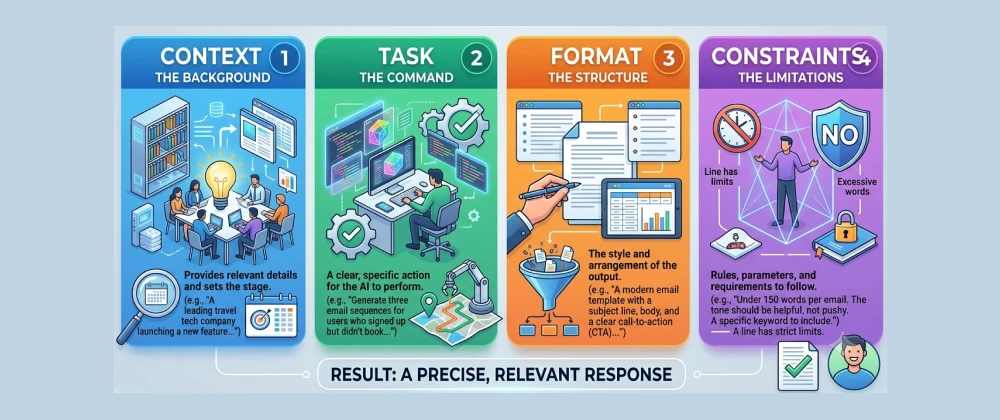
- Each example follows the same four-part structure — context, task, format, constraints — for consistent results
- They work across ChatGPT, Claude, and Gemini with little to no adjustment
- Copy, paste, and swap in your own details — no prompting experience required
- Each example includes a short note on why it works, so you can adapt the pattern to your own tasks
Table of Contents
Stop Starting From a Blank Prompt
If you've ever typed "write me an email" into ChatGPT and gotten back something flat and generic, you're not doing anything wrong — you just haven't seen the pattern yet. The difference between a forgettable AI response and a genuinely useful one usually comes down to a handful of small, repeatable structural choices.
Across offices in the US and Europe, the people getting the most out of ChatGPT, Claude, and Gemini aren't the most technical — they're the ones reusing a small set of prompt patterns for their most common tasks.
This guide from SmartAIHuman.com collects 10 of those patterns, ready to copy, paste, and adapt to your own work today.
How We Tested These Prompts
Our Testing Methodology
- Ran each prompt across three models: ChatGPT, Claude, and Gemini, checking for consistent quality without model-specific tweaking.
- Selected for frequency: Each example maps to a task common across US and EU marketing, support, and operations roles.
- Applied the four-element framework: Every prompt below includes context, task, format, and constraints — the same structure covered in our beginner's guide.
- Checked for over-reliance risk: We flagged where output still needs a human review pass before use.
What Makes a Prompt "Good"?
A good prompt gives the AI everything it needs to produce a usable answer in one pass: context about the situation, a specific task, a desired format, and any constraints on tone or length. Every example below follows that same structure, so once you see the pattern once, you can adapt it to tasks we haven't listed.
The 10 Examples
Copy any of these directly, swapping the bracketed details for your own. Each one is annotated with why it works.
Where These Prompts Fit at Work
Marketing and Communications
Examples 3, 4, 8, and 9 map directly to the weekly workload of marketing teams at US and EU small businesses — drafting variations quickly, then editing rather than starting from nothing.
Customer Support and Client-Facing Roles
Examples 1, 3, and 9 help support and account teams respond faster without losing the empathetic tone that keeps customers from escalating a complaint.
Operations, HR, and Admin
Examples 2, 5, 6, 7, and 10 handle the internal documentation and summarization work that quietly eats up hours for operations and HR staff across US and EU offices.
Pros & Cons of Using Prompt Templates
✅ Pros
- Saves time versus writing a new prompt from scratch each time
- Produces more consistent output quality across a team
- Easy to adapt — swap the bracketed details, keep the structure
- Works across multiple AI tools without rewriting
⚠️ Cons
- Templates can feel formulaic if used without any customization
- Still requires a human review pass, especially for customer-facing content
- Overly rigid constraints can occasionally produce stilted phrasing
- Doesn't replace understanding why the structure works, which matters for novel tasks
Alternatives to Manual Prompt Templates
If maintaining a personal prompt library feels like overhead, a few lighter options exist:
- Built-in AI writing assistants: Tools like Gemini in Google Docs or Copilot in Microsoft Word increasingly suggest structure automatically, reducing the need to write prompts from scratch.
- Shared team prompt libraries: Some teams maintain a shared doc of approved prompts for recurring tasks, so individual staff don't need to remember the structure themselves.
- Custom instructions / project-level settings: ChatGPT and Claude both support persistent custom instructions, which can bake in tone and format preferences so you don't need to restate them each time.
Expert Insights
Workforce research from institutions like MIT CSAIL and Stanford HAI consistently points to the same finding: the gap between weak and strong AI output is rarely about the AI model itself, and almost always about how specifically the request was framed. Structured, example-driven learning — seeing a real prompt rather than reading an abstract rule — tends to close that gap faster than general advice like "be more specific."
Future Trends: Where Prompt Examples Are Headed
Expect AI tools themselves to get better at prompting you back — asking clarifying questions before generating an answer, rather than requiring a perfectly structured prompt upfront. Until that's reliable across every tool, having a small personal library of tested examples like these remains one of the fastest ways to get consistently better output.
Overall Usefulness Rating
Frequently Asked Questions
Real questions US and European readers search for, answered clearly.
Your Starting Prompt Library
You don't need to memorize prompt engineering theory to get better results from ChatGPT, Claude, or Gemini today — you just need a handful of tested patterns to start from, and the willingness to swap in your own details.
Save these 10 examples, adapt them to your actual workload, and notice which ones you reach for most. That's usually the fastest sign of where a personal prompt library saves you the most time.
At SmartAIHuman.com, we'll keep expanding this library as new use cases and AI tools become part of everyday US and EU workplaces.
Related Articles on SmartAIHuman.com
Sources & External Authority References
- MIT Computer Science and Artificial Intelligence Laboratory (CSAIL) — Generative AI Research Overview. csail.mit.edu
- Stanford Institute for Human-Centered Artificial Intelligence (HAI) — AI Index Report. hai.stanford.edu
- McKinsey & Company — The State of AI in the Workplace. mckinsey.com

SmartAIHuman Editorial Team shares practical AI guides, tool reviews, productivity strategies, and beginner-friendly tech tutorials to help readers use AI effectively in everyday life.