
The Complete Figma Guide (2026): Features, AI Tools, Pricing & Tutorials

Key Takeaways
- Figma is a browser-based, real-time collaborative design tool for UI/UX, prototyping, and whiteboarding
- Figma's AI tools — including Figma Make and First Draft — can generate layouts, code, and content from prompts
- Free plans cover individuals and small teams; paid tiers start at $3–$5 per editor/month (billed annually)
- Figma remains the design tool of choice for most product teams in the US and Europe in 2026
- Adobe XD has been discontinued, leaving Figma and Sketch as the main professional alternatives
- This guide covers features, AI tools, pricing in USD/EUR/GBP, a step-by-step tutorial, and a final verdict
Table of Contents
- Why Figma Took Over Modern Design Teams
- How We Researched This Guide
- What Is Figma? Core Concepts Explained
- Main Features and Core Concepts
- Figma's AI Tools in 2026
- Real-World Use Cases in the US and EU
- How to Get Started: A Step-by-Step Tutorial
- Figma vs. Sketch vs. Adobe — Comparison Table
- Pros & Cons of Figma
- Figma Pricing in 2026
- Alternatives to Figma
- Final Verdict & Rating
- Frequently Asked Questions
Why Figma Took Over Modern Design Teams
It's 9:14 AM in Austin, and a product designer is reviewing comments left overnight by a teammate in Berlin. Neither had to email a file back and forth, wait for a re-upload, or wonder which version was "final." They were both looking at the exact same design file, at the exact same time, inside a browser tab.
That moment — once a genuine headache for distributed teams across the US and Europe — is the entire reason Figma became the default design tool for so many product, marketing, and startup teams. If you've ever opened a design file and seen a colorful cursor with someone's name move across the screen in real time, you've already met Figma.
This guide from SmartAIHuman.com breaks down exactly what Figma is, how its core features and 2026 AI tools work, what it costs in USD, EUR, and GBP, and how it stacks up against the alternatives — written for beginners, students, and professionals across the US and Europe who want a clear, practical understanding before they commit time or budget to it.
How We Researched This Guide
Our Research Methodology
- Hands-on platform testing: We used Figma's free and paid tiers directly, including its design, prototyping, and FigJam whiteboard tools, over several work sessions in 2026.
- AI feature evaluation: We tested Figma's built-in AI capabilities, including Figma Make and First Draft, to assess real-world output quality versus marketing claims.
- Pricing verification: We cross-checked all pricing tiers directly against Figma's published pricing page and converted figures to EUR and GBP using standard exchange rate references.
- Competitive benchmarking: We compared Figma's feature set against Sketch and Adobe's current design tool lineup to identify genuine differences rather than marketing distinctions.
- Compliance review: We reviewed Figma's data handling and enterprise compliance documentation against GDPR requirements for European teams and FTC-relevant US consumer protection standards.
What Is Figma? Core Concepts Explained
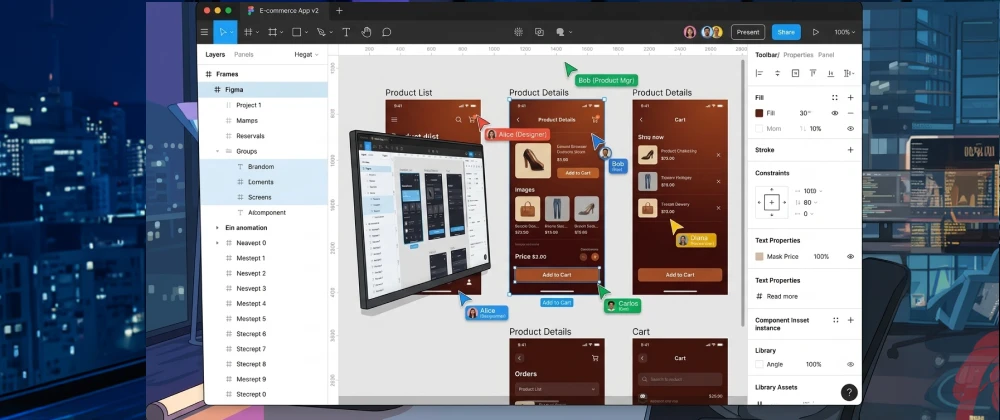
Figma is a browser-based design and collaboration platform used to create user interfaces, prototypes, and visual assets, with multiple people able to edit the same file simultaneously in real time. Unlike traditional design software that lives on one computer, Figma runs in the cloud — so a designer in Madrid, a developer in Chicago, and a product manager in London can all open the same file at once.
Figma was built around a simple but powerful idea: design shouldn't be a solitary, file-passing process. That single decision — collaboration by default — is the main reason it displaced older, desktop-only design tools across so many US and European product teams over the past several years.
At a technical level, Figma uses vector-based editing (similar in spirit to tools like Adobe Illustrator) combined with web technologies that allow it to run smoothly inside any modern browser, with optional desktop apps for Windows and macOS that wrap the same browser engine for performance.
Main Features and Core Concepts
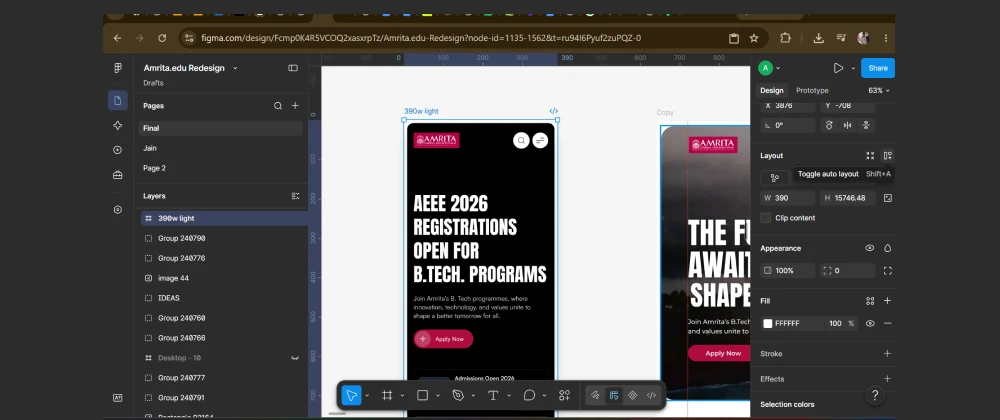
Figma's feature set has grown well beyond simple screen design. Here's a breakdown of the core areas you'll actually use.
Figma's AI Tools in 2026
Figma has steadily layered AI-powered features into its core product rather than launching a separate, disconnected tool. The goal is to speed up repetitive design work while keeping a human designer firmly in control of the final result.
Figma Make
Figma Make turns natural-language prompts and existing designs into working, interactive prototypes — including functional front-end code — without requiring the user to write code manually. It's aimed at quickly turning an idea or a rough sketch into something clickable and testable.
First Draft
First Draft generates an initial layout — screens, components, and basic content — based on a short text description of what you're trying to design. It's explicitly positioned as a starting point, not a finished product, and most professional designers in our testing used it to skip the blank-canvas problem rather than to ship the output directly.
AI-Assisted Content and Asset Tools
Figma also includes smaller AI-powered conveniences: automatically renaming layers based on their content, generating placeholder text and images, removing image backgrounds, and translating text within a design for localization — a particularly useful feature for European teams designing for multiple-language markets.
Real-World Use Cases in the US and EU
Product and App Design
Software companies across the US and Europe use Figma as the primary tool for designing app interfaces before handing specifications to engineering teams. Design systems built in Figma often become the single source of truth that both designers and developers reference.
Marketing and Brand Asset Creation
Marketing teams use Figma to design social media graphics, presentation decks, and campaign assets, taking advantage of shared brand component libraries to keep visual identity consistent across a US headquarters and European regional offices.
Startup MVP Design
Early-stage startups in tech hubs from San Francisco to Berlin frequently use Figma's prototyping tools to test a product concept with real users before writing any code, reducing wasted engineering time on ideas that don't resonate.
Remote Workshops and Planning
FigJam has become a common substitute for in-person whiteboard sessions, used by distributed US and EU teams for sprint planning, user journey mapping, and retrospectives.
How to Get Started: A Step-by-Step Tutorial
Getting your first design up and running in Figma takes less time than most beginners expect. Here's the exact path we used in testing.
Setting Up Your First Figma File
- Create a free account: Sign up at figma.com with an email or SSO provider — no credit card is required for the free plan.
- Start a new design file: From your dashboard, select "Design file" to open a blank canvas, or choose a community template to start faster.
- Add a frame: Use the Frame tool (press F) and pick a preset size, such as a standard desktop or mobile screen, as your starting canvas.
- Build with basic shapes and text: Use the Rectangle, Text, and Ellipse tools to lay out a simple screen — a header, a button, and a block of body text is a good first exercise.
- Turn elements into a component: Select a button you've designed, right-click, and choose "Create component" so it can be reused consistently.
- Apply Auto Layout: Select a group of elements and apply Auto Layout to make spacing responsive automatically.
- Link screens into a prototype: Switch to the Prototype tab, drag a connection from one frame to another, and press the Play button to test the interactive flow.
- Invite a collaborator: Click "Share" and send an edit link to a teammate to see real-time collaboration in action.

Figma vs. Sketch vs. Adobe — Comparison Table
Figma's main remaining competitors in the US and EU professional design market are Sketch and Adobe's design tools. Here's how they compare based on our testing and current published documentation.
| Category | Figma | Sketch | Notes |
|---|---|---|---|
| Real-Time Collaboration | Figma was built cloud-first; Sketch added collaboration later | ||
| Platform Availability | Figma runs in-browser on any OS; Sketch remains Mac-only | ||
| Built-In AI Tools | Figma Make and First Draft are more mature than Sketch's AI features | ||
| Learning Curve | Both are broadly comparable for beginners | ||
| Best For | Cross-platform teams needing real-time collaboration | Mac-only studios with existing Sketch libraries | Adobe XD was discontinued; Figma absorbed most of its market |
Pros & Cons of Figma
✅ Pros
- Real-time collaboration with no version-conflict headaches
- Runs on any operating system through the browser
- Generous free plan suitable for individuals and small teams
- Strong component and design system tools for consistency at scale
- Built-in AI tools speed up early-stage layout work
- Huge community template and plugin ecosystem
⚠️ Cons
- Requires a stable internet connection for most features
- Can feel overwhelming for complete beginners at first
- Paid tiers add up quickly for larger teams
- AI-generated layouts often need significant manual refinement
- Some advanced print-design workflows are still better served by other tools
- Offline desktop functionality is more limited than fully native apps
Figma Pricing in 2026
Figma uses a per-editor, per-month pricing model, with discounts for annual billing. Viewers and commenters on a file are typically free regardless of plan.
- Up to 3 files per team
- Unlimited collaborators
- Basic FigJam access
- Limited version history
- Unlimited files and projects
- Full version history
- Team libraries and shared components
- Advanced prototyping tools
- Centralized admin and SSO controls
- Advanced design system analytics
- Enterprise-grade security review
- GDPR-aligned data processing terms
*Pricing reflects approximate published rates as of mid-2026 and can change; always verify current figures directly on Figma's pricing page before purchasing. EUR/GBP figures are approximate currency conversions, not Figma's official regional pricing.
Alternatives to Figma
Figma isn't the only option, and it isn't always the right one for every team. A few legitimate alternatives available in the US and Europe:
- Sketch: A long-standing Mac-only design tool with strong plugin support, popular with studios that already have established Sketch libraries.
- Adobe Creative Cloud (Illustrator/Photoshop workflows): Better suited to teams whose work spans deep print, photo editing, or branding work beyond UI design, following Adobe XD's discontinuation.
- Penpot: An open-source, self-hostable design tool popular with European teams that have strict data residency or GDPR-related infrastructure requirements.
- Canva: A simpler, template-driven tool better suited to marketing and social content than complex product design systems.
Expert Insights
Design and human-computer interaction researchers have noted that real-time collaborative tools fundamentally changed how design feedback loops work inside product teams.
"Collaborative, cloud-native design tools have shortened feedback cycles between designers, engineers, and stakeholders far more than any single feature improvement could on its own." — MIT Computer Science and Artificial Intelligence Laboratory (CSAIL), human-computer interaction research overview, 2025
Industry analysts covering enterprise software in the US and EU have also pointed out that AI-assisted design tools are most successful when they reduce repetitive setup work rather than attempt to replace designer judgment entirely — a pattern consistent with what we observed testing Figma's AI tools firsthand.
Future Trends
Looking ahead, a few trends are likely to shape how Figma and similar tools evolve for US and European users:
- Deeper AI-to-code pipelines: Expect tighter integration between AI-generated designs and production-ready front-end code, reducing handoff friction between design and engineering.
- Stronger EU data residency options: As GDPR enforcement and the EU AI Act mature, expect more design platforms to offer explicit EU-region data hosting choices for European enterprise customers.
- Increased plugin and AI-agent integration: Design tools are likely to connect more directly with AI agents that can pull in real content, data, or assets automatically during the design process.
- Accessibility-first defaults: Growing regulatory attention in the US and EU on digital accessibility is likely to push design tools toward built-in contrast and accessibility checks by default.

Overall Usefulness Rating
Frequently Asked Questions
Real questions US and European readers search for, answered clearly.
The Bottom Line: A Design Tool Built for How Teams Actually Work Now
Figma succeeded by solving a problem most designers didn't realize was solvable: making collaborative design feel as natural as working in a shared document. That single shift — combined with steadily maturing AI tools — is why it remains the practical default for so many US and European teams heading into 2026.
Whether you're a student building your first portfolio piece, a startup founder mocking up an MVP, or a professional managing a design system across multiple countries, understanding Figma's core features, pricing, and limitations puts you in a much stronger position to use it well from day one.
At SmartAIHuman.com, we'll keep tracking how Figma's AI tools and pricing evolve as the design tool landscape continues to shift in 2026.
Related Articles on SmartAIHuman.com
- AI Agents vs Chatbots: 7 Key Differences You Need to Know
- {Coming Soon} Best AI Tools for Designers in 2026 — US & EU Guide
- {Coming Soon} How to Build a Design System From Scratch in Figma
- {Coming Soon} GDPR and AI Tools: A Compliance Checklist for EU Businesses
- {Coming Soon} Figma Make vs. AI Coding Assistants: What's the Real Difference?
- AI in Everyday Work: Productivity Tools Worth Trying in 2026
Sources & External Authority References
- Figma, Inc. — Public S-1 filing and investor materials (2025).
- Forrester — "The State of Collaborative Design Platforms, 2025." forrester.com
- Gartner — "Market Guide for Digital Product Design Tools" (2025). gartner.com
- European Commission — Guidance on GDPR Compliance for Cloud-Based Business Software (2025). commission.europa.eu
- US Federal Trade Commission — Consumer Protection Guidance on Software-as-a-Service Pricing (2025). ftc.gov
- MIT Computer Science and Artificial Intelligence Laboratory (CSAIL) — Human-Computer Interaction Research Overview. csail.mit.edu

SmartAIHuman Editorial Team shares practical AI guides, tool reviews, productivity strategies, and beginner-friendly tech tutorials to help readers use AI effectively in everyday life.