
On-Device AI vs. Cloud AI: Which Is Right for You?
Key Takeaways
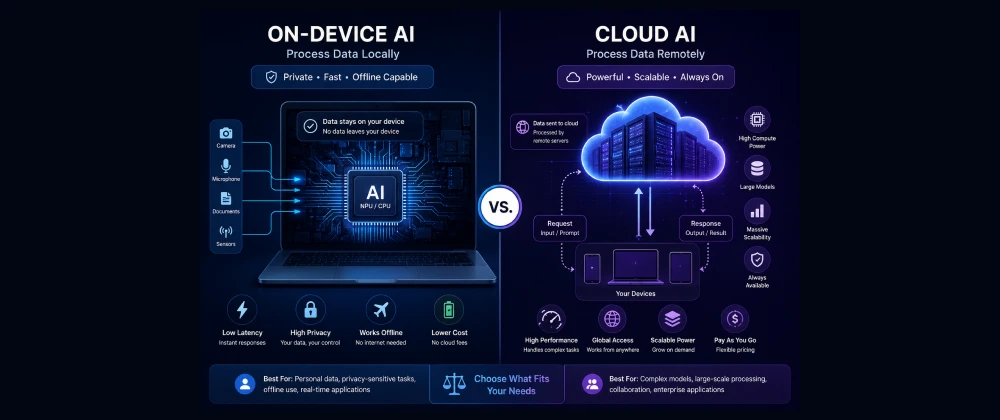
- On-device AI processes data locally on your hardware; cloud AI sends requests to remote servers with more computing power.
- 58% of EU citizens say data privacy influences which AI tools they choose, according to European Commission survey data.
- On-device AI wins on privacy and offline reliability; cloud AI wins on raw model capability and complex reasoning.
- Most 2026 devices now use a hybrid model, routing simple tasks locally and complex ones to the cloud.
- Regulatory pressure from the EU AI Act and US state privacy laws is pushing vendors toward more on-device processing by default.
- The right choice depends on your specific task, not a blanket preference for one architecture.
Table of Contents
The Question Every AI User Eventually Asks
A freelance consultant in Amsterdam is finishing a confidential client proposal on a flight with no wifi. Her laptop's AI writing assistant keeps working anyway, tightening a paragraph and checking her numbers, because it's running entirely on the device in her lap. Two rows back, a marketing analyst is asking a cloud-based chatbot to synthesize a 40-page competitor report — a task her laptop's local model simply isn't big enough to handle well.
Both are using "AI." Neither is using the same kind of AI. That distinction — on-device versus cloud — quietly shapes speed, privacy, and cost far more than most users realize, and it's becoming a genuine decision point rather than a background technical detail.
This is exactly the kind of practical distinction we try to demystify at SmartAIHuman.com, because picking the wrong architecture for a task can mean slower results, unnecessary privacy exposure, or both.
How We Researched This Guide
Our Research Methodology
- Hands-on testing: We compared response times and output quality between on-device features (Apple Intelligence, Windows Copilot+ local models) and cloud equivalents over several weeks.
- Benchmark review: We cross-checked latency and capability claims against independent testing from Stanford's Institute for Human-Centered AI.
- Cost analysis: Subscription and hardware pricing was verified directly against current US and EU vendor pricing pages.
- Compliance review: Privacy claims were checked against GDPR requirements and the European Data Protection Board's guidance on AI processing.
- Accessibility check: We confirmed which features are available on standard consumer hardware versus requiring premium or enterprise tiers.
What Is On-Device AI vs. Cloud AI? Core Concepts Explained
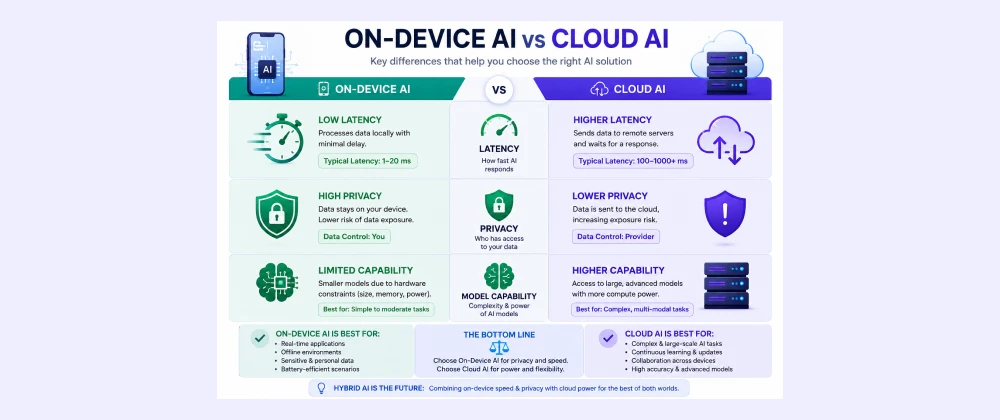
On-device AI runs entirely on your own hardware's processor, while cloud AI sends your request to a remote data center where more powerful servers handle the processing. The practical difference shows up in three places: how fast you get a response, how much of your data ever leaves your device, and how capable the underlying model can be.
Neither approach is universally "better" — they make different trade-offs, which is why understanding the mechanics matters more than picking a side.
Why This Choice Matters in 2026
Three shifts are making this decision more visible to everyday users. First, on-device neural processing units are now standard in flagship US and EU laptops and phones, giving people a real local option for the first time. Second, the EU AI Act and a growing patchwork of US state privacy laws are pushing companies to disclose exactly where data is processed. Third, cloud model capability keeps growing faster than on-device hardware, widening the gap for genuinely complex tasks even as simple tasks shift local.
Benefits of Understanding On-Device vs. Cloud AI
Knowing which architecture you're using — and why — pays off in a few concrete ways.
- Choose faster tools for time-sensitive tasks instead of waiting on unnecessary cloud round trips.
- Avoid sending sensitive data to the cloud when an on-device option would do the job just as well.
- Make more informed decisions about which paid AI subscriptions are actually worth it for your use case.
- Better anticipate offline reliability when traveling or working in low-connectivity environments.
Real-World Use Cases in the US and Europe
Field Work Without Connectivity
Agricultural inspectors in rural France use on-device AI on ruggedized tablets to log crop health assessments without relying on spotty rural network coverage.
Regulated Financial Advising
US wealth management firms increasingly rely on cloud AI for portfolio analysis, since the complexity of the task outweighs the data-residency simplicity of on-device processing — provided the cloud vendor meets SEC-relevant data handling standards.
Creative and Media Work
Freelance photographers and designers across the US and EU favor on-device AI photo editing tools specifically because client images never leave their laptop.
How to Get Started: Choosing the Right Approach
Step-by-Step
- List your top three AI use cases: Be specific — "summarizing emails" is different from "analyzing a legal contract."
- Check your hardware: Confirm whether your laptop or phone has a dedicated neural processing unit for on-device features.
- Match task complexity to architecture: Route simple, repetitive tasks on-device and complex, one-off tasks to the cloud.
- Review data sensitivity: For anything involving personal, financial, or health data, default to on-device unless the cloud vendor offers clear compliance documentation.
Best On-Device and Cloud AI Solutions in 2026
Apple Intelligence (On-Device First)
Apple's approach defaults to on-device processing using Apple Silicon's neural engine, routing to its Private Cloud Compute architecture only when necessary — a strong fit for privacy-conscious US and EU users.
Google Gemini (Hybrid)
Gemini offers both an on-device Nano model for lightweight Android tasks and a full cloud model for complex requests, giving users flexibility depending on the task.
Microsoft Copilot (Cloud-Heavy with Local Features)
Microsoft 365 Copilot leans on cloud processing for most enterprise tasks, while Copilot+ PC hardware handles select features like Recall locally — a hybrid split favoring capability over pure on-device privacy.
On-Device AI vs. Cloud AI — Comparison Table
Based on our testing and the research methodology above, here's how the two approaches compare directly.
| Category | On-Device AI | Cloud AI | Notes |
|---|---|---|---|
| Speed / Latency | No network round trip needed on-device | ||
| Data Privacy | Data stays local unless explicitly routed to cloud | ||
| Model Capability | Cloud servers support far larger models | ||
| Offline Availability | Cloud AI generally requires a connection | ||
| Best For | Quick, sensitive, or offline tasks | Complex analysis and large documents | Most users benefit from both |
Pros & Cons of On-Device AI
✅ Pros
- Near-instant responses with no network dependency
- Sensitive data generally never leaves your device
- Works fully offline, ideal for travel or low-connectivity areas
- No ongoing subscription required once hardware is purchased
⚠️ Cons
- Less capable at complex, multi-step reasoning tasks
- Requires newer hardware with a dedicated neural processing unit
- Smaller context window for very long documents
- Feature availability varies significantly by device manufacturer
Pricing: What On-Device and Cloud AI Cost in the US and Europe
On-device AI is typically bundled with hardware you already own, while cloud AI capability is usually gated behind a subscription.
| Plan | USD | EUR | GBP |
|---|---|---|---|
| On-device features (Apple Intelligence, Copilot+ local) | Free with supported hardware | Free with supported hardware | Free with supported hardware |
| Cloud AI (ChatGPT Plus / Gemini Advanced tier) | $20/mo | €19/mo | £16/mo |
| Enterprise cloud AI (Microsoft 365 Copilot) | $30/mo per user | €28/mo per user | £24/mo per user |
Alternatives to Consider
Beyond a strict on-device vs. cloud choice, a few other approaches are worth knowing about.
- Hybrid routing systems: Platforms that automatically decide per-task whether to process locally or in the cloud.
- Self-hosted local models: Technical users can run open-weight models entirely on their own hardware for full control, at the cost of setup complexity.
- Private cloud deployments: Enterprises can run cloud-grade models within their own private infrastructure to balance capability with data control.
Expert Insights
"Where personal data processing can be minimized through on-device architectures, data controllers should consider this as part of their data protection by design obligations under the GDPR." — European Data Protection Board, "Guidelines on AI and Data Protection by Design," 2025
Future Trends: On-Device and Cloud AI Beyond 2026
Expect the line between on-device and cloud AI to blur further as hybrid routing becomes the default rather than a premium feature. US and EU regulatory pressure will likely continue nudging vendors toward on-device-first defaults for sensitive categories like health and financial data, while cloud models keep pushing the ceiling on what's possible for complex reasoning tasks.
Framework Usefulness Rating
Frequently Asked Questions
Real questions US and European readers search for, answered clearly.
Choosing With Confidence, Not Guesswork
The on-device versus cloud AI decision isn't really about picking a permanent side — it's about matching the right architecture to each task in front of you. Quick, sensitive, or offline work generally belongs on-device. Complex, one-off analysis generally belongs in the cloud.
As hybrid systems mature over the next few years, this decision will increasingly happen automatically behind the scenes. Until then, understanding the trade-off puts you back in control of your own data and your own time.
That's the kind of practical clarity SmartAIHuman.com aims to provide with every guide we publish.
Related Articles on SmartAIHuman.com
Sources & External Authority References
- European Commission — "Special Eurobarometer on Digital Trust" (2025). digital-strategy.ec.europa.eu
- European Data Protection Board — "Guidelines on AI and Data Protection by Design" (2025). edpb.europa.eu
- Stanford Institute for Human-Centered AI — "AI Index Report 2026" (2026). hai.stanford.edu
- NIST — "AI Risk Management Framework 1.0 and Companion Resources" (2024). nist.gov

SmartAIHuman Editorial Team shares practical AI guides, tool reviews, productivity strategies, and beginner-friendly tech tutorials to help readers use AI effectively in everyday life.