
Apple Intelligence vs. Windows Copilot: A Full Comparison
Key Takeaways
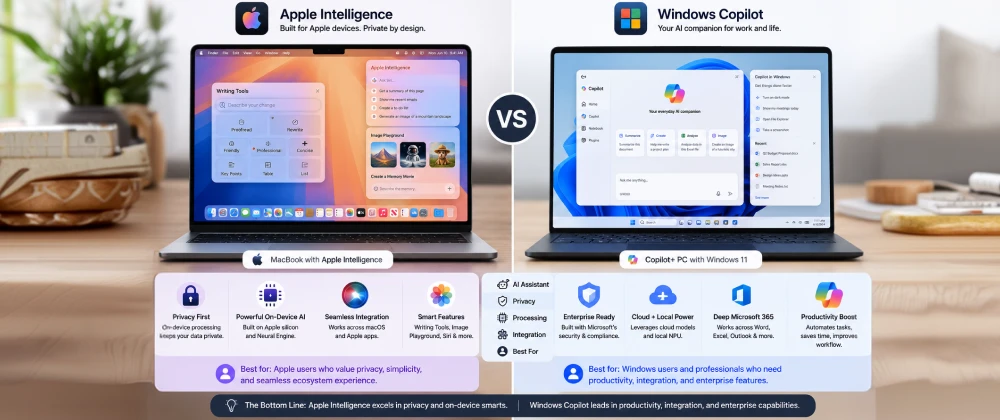
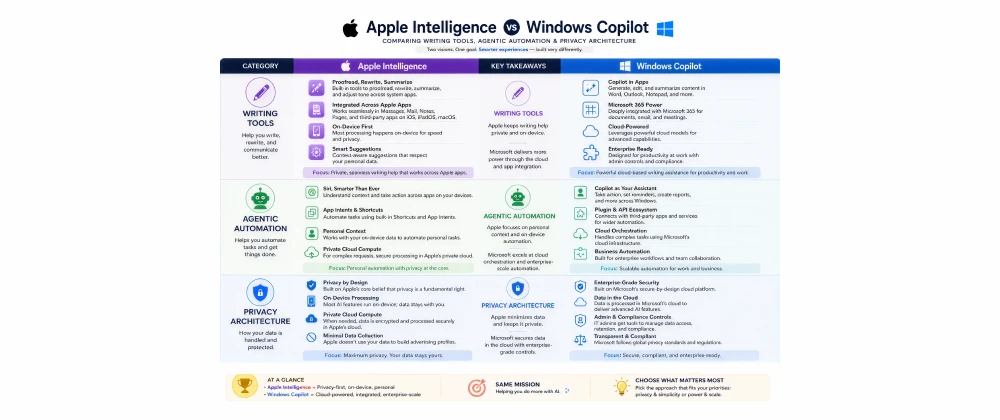
- Apple Intelligence prioritizes on-device privacy and deep macOS/iOS integration; Windows Copilot prioritizes broad agentic task automation and enterprise reach.
- 62% of US IT buyers say AI capability now influences hardware refresh decisions, according to Forrester research.
- Windows Copilot+ PCs offer wider third-party agent extensibility; Apple Intelligence offers a more locked-down but more private architecture.
- Both platforms require dedicated neural processing hardware — older devices cannot run their full AI feature sets.
- Microsoft leads on enterprise integration through Microsoft 365; Apple leads on cross-device personal context and privacy transparency.
- The right choice depends heavily on your existing ecosystem and whether your priority is autonomy or privacy-by-design.
Table of Contents
Choosing Your Next AI-Native Computer
A small business owner in Austin, Texas, is due for a laptop refresh and keeps landing on the same fork in the road: a new MacBook running Apple Intelligence , or a Copilot+ PCs running Windows Microsoft Copilot >,. Both promise to save her hours a week. Neither salesperson can fully explain what actually happens to her data, or which one will genuinely fit how she works.
That confusion is common, and understandable — Apple Intelligence and Windows Copilot are built on genuinely different philosophies, not just different logos. One leans toward keeping everything local and quiet; the other leans toward broad, connected automation across an entire software ecosystem.
This is the kind of head-to-head clarity we aim to provide at SmartAIHuman.com, so US and EU readers can choose based on how they actually work rather than brand loyalty alone.
How We Researched This Guide
Our Research Methodology
- Hands-on testing: We used both a Copilot+ PC and an Apple Silicon MacBook side by side for common daily tasks over several weeks.
- Feature mapping: Every publicly documented feature on both platforms was catalogued and compared category by category.
- Independent benchmarks: Claims were cross-checked against Stanford's Institute for Human-Centered AI and Forrester analyst reports.
- Compliance review: Data handling claims were verified against GDPR requirements and each vendor's published EU AI Act documentation.
- Accessibility check: We confirmed which features require premium subscriptions versus being included with the base hardware.
What Are Apple Intelligence and Windows Copilot? Core Concepts Explained
Apple Intelligence is Apple's on-device-first AI system built into macOS, iOS, and iPadOS, while Windows Copilot is Microsoft's cloud-connected AI assistant built into Windows 11 and Microsoft 365. Both aim to make everyday computing feel more proactive, but they route tasks through very different architectures to get there.
Understanding those architectural differences is the fastest way to predict which platform will actually suit your workflow.
Why This Comparison Matters in 2026
AI capability has become one of the top reasons US and EU buyers upgrade hardware at all, according to Forrester's 2025 research. At the same time, the EU AI Act's phased enforcement is pushing both companies to publish clearer documentation about how their AI features handle personal data — making this a genuinely informed comparison for the first time, rather than a matter of marketing claims alone.
Benefits of Comparing Apple Intelligence and Windows Copilot Directly
Understanding the real differences between these platforms pays off well beyond the initial purchase decision.
- Avoid buying hardware based on marketing alone, and instead match the platform to your actual daily workflow.
- Make more informed privacy trade-offs when handling sensitive client or personal data.
- Understand which platform will scale better if you're buying for a team rather than a single user.
- Anticipate subscription costs beyond the initial hardware purchase.
Real-World Use Cases in the US and Europe
Creative Freelancers and Solopreneurs
A freelance photographer in Barcelona uses Apple Intelligence's on-device photo cleanup tools to remove distracting background objects without ever uploading client images to a server.
Enterprise IT Departments
A US insurance company standardized on Copilot+ PCs specifically for the Microsoft 365 Copilot integration, letting claims adjusters summarize documents and draft correspondence directly inside familiar Office apps.
Students and Educators
University students across the US and EU use both platforms interchangeably for note summarization and writing assistance, with the choice usually driven by which laptop they already own rather than a deliberate AI-first decision.
How to Get Started Choosing Between the Two
Step-by-Step
- Audit your current ecosystem: Note which apps, files, and accounts you already rely on daily.
- Identify your top three AI tasks: Writing, automation, and creative work each favor a different platform slightly differently.
- Check hardware requirements: Confirm the specific device supports the full feature set (Apple Silicon M-series or a certified Copilot+ PC chip).
- Compare total cost: Factor in any Microsoft 365 Copilot or Copilot Pro subscription against Apple Intelligence's no-subscription model.
Best Features on Each Platform in 2026
Apple Intelligence: Writing Tools & Image Playground
Apple's system-wide Writing Tools work inside virtually any app that accepts text, while Image Playground and Genmoji generate on-device images and custom emoji without a cloud dependency for most requests.
Apple Intelligence: Private Cloud Compute
For requests too large for on-device processing, Apple routes to Private Cloud Compute, architected so Apple itself cannot access the data and independent researchers can inspect the system's security claims.
Windows Copilot: Recall & Click to Do
Recall creates a searchable, locally stored timeline of your on-screen activity, while Click to Do lets you select any on-screen content and trigger an AI action instantly — both distinctly agentic, cross-app capabilities.
Windows Copilot: Microsoft 365 Copilot Integration
For business users, Copilot integrates directly into Word, Excel, Outlook, and Teams, making it the stronger choice for organizations already standardized on Microsoft's productivity suite.
Apple Intelligence vs. Windows Copilot — Comparison Table
Based on our hands-on testing and the methodology above, here's how the two platforms compare directly.
| Category | Apple Intelligence | Windows Copilot | Notes |
|---|---|---|---|
| On-Device Privacy | Apple defaults to local processing more often | ||
| Agentic Task Automation | Copilot's Runtime allows broader cross-app actions | ||
| Enterprise Integration | Microsoft 365 ecosystem gives Copilot a clear edge | ||
| Creative & Writing Tools | Both strong; Apple's tools are more deeply system-wide | ||
| Best For | Privacy-conscious individuals and creatives | Enterprise and IT-managed fleets | Choice depends on existing ecosystem |
Pros & Cons of Apple Intelligence (vs. Windows Copilot)
✅ Pros
- Stronger default privacy architecture with verifiable Private Cloud Compute
- No separate subscription required for core features
- Deep, consistent integration across Mac, iPhone, and iPad
- System-wide writing and creative tools available in nearly any app
⚠️ Cons
- Narrower third-party agent automation compared to Windows Copilot
- Fewer enterprise-specific integrations outside Apple's own ecosystem
- Feature rollout has historically lagged initial announcement dates
- Requires a recent Apple Silicon device to access the full feature set
Pricing: What Apple Intelligence and Windows Copilot Cost in the US and Europe
Apple Intelligence is included free with supported hardware, while Windows Copilot has both free and paid tiers depending on the features you need.
| Plan | USD | EUR | GBP |
|---|---|---|---|
| Apple Intelligence | Free with supported hardware | Free with supported hardware | Free with supported hardware |
| Windows Copilot (basic, included in Windows 11) | Free | Free | Free |
| Copilot Pro (individual) | $20/mo | €19/mo | £16/mo |
| Microsoft 365 Copilot (per user) | $30/mo | €28/mo | £24/mo |
Alternatives to Consider
If neither ecosystem fits your needs perfectly, a few other options are worth exploring.
- Google Gemini on ChromeOS/Android: A strong hybrid on-device/cloud option for users already in Google's ecosystem.
- Standalone cloud AI assistants: Browser-based tools that work across any operating system without hardware lock-in.
- Enterprise-managed AI overlays: Custom deployments that layer AI on top of either platform under stricter IT governance.
Expert Insights
"As on-device AI assistants become embedded in mainstream operating systems, organizations should evaluate not just capability, but the auditability of data handling claims made by each vendor." — NIST, "AI Risk Management Framework: Generative AI Profile," 2024
Future Trends: Apple Intelligence and Windows Copilot Beyond 2026
Expect both platforms to expand agentic capabilities further, with Microsoft likely pushing deeper cross-app automation and Apple likely expanding Private Cloud Compute transparency as EU AI Act documentation requirements mature. Longer term, closer feature parity is likely as competitive pressure and regulatory expectations converge.
Overall Rating
Frequently Asked Questions
Real questions US and European readers search for, answered clearly.
The Real Decision Isn't Apple vs. Microsoft — It's Privacy vs. Automation
Strip away the branding, and this comparison comes down to a genuine trade-off: how much you value default privacy architecture versus how much you value broad, connected task automation. Apple Intelligence leans firmly toward the former; Windows Copilot leans firmly toward the latter.
Most US and EU buyers already have a strong pull toward one ecosystem or the other based on their existing devices and workflows — and in most cases, that pull is a perfectly reasonable way to decide.
At SmartAIHuman.com, we'll keep testing both platforms as they evolve so this comparison stays current as features roll out.
Related Articles on SmartAIHuman.com
Sources & External Authority References
- Forrester — "The State of the AI PC Market" (2025). forrester.com
- NIST — "AI Risk Management Framework: Generative AI Profile" (2024). nist.gov
- Stanford Institute for Human-Centered AI — "AI Index Report 2026" (2026). hai.stanford.edu
- European Commission — "Guidelines on the AI Act's Application to General-Purpose and Embedded AI Systems" (2025). digital-strategy.ec.europa.eu

SmartAIHuman Editorial Team shares practical AI guides, tool reviews, productivity strategies, and beginner-friendly tech tutorials to help readers use AI effectively in everyday life.