
AI Memory: Why Every Assistant Needs Long-Term Memory to Actually Help You
Key Takeaways
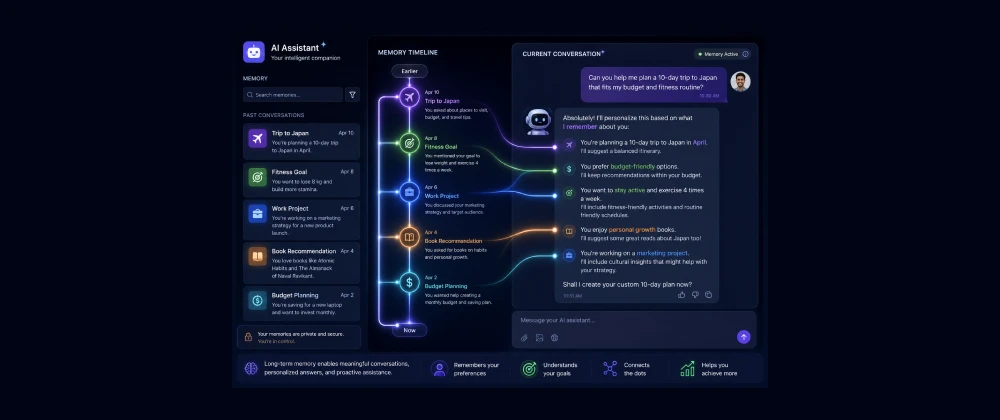
- AI memory is a system that lets an assistant recall facts, preferences, and context from past conversations without the user repeating them.
- About 1 in 3 US and EU knowledge workers now use an AI assistant daily, yet most still re-explain the same background details every session, according to Pew Research Center survey data (2024).
- Long-term memory is different from a large context window: context windows hold one conversation, memory persists across many.
- Major assistants — including ChatGPT, Claude, and Gemini — have all shipped some form of persistent memory since 2024.
- Under GDPR and the EU AI Act, persistent memory raises real questions about consent, data minimization, and the right to erasure.
- The best memory systems let users view, edit, and delete what's remembered — treating memory as a feature the user controls, not a black box.
Table of Contents
The Assistant That Forgets Everything You Just Told It
Picture a freelance marketing consultant in Berlin. Every Monday, she opens her AI assistant to plan the week's client content, and every Monday she starts by re-explaining the same five things: her brand voice guidelines, which client is B2B versus B2C, her preferred tone, her recurring deadlines, and the fact that she writes in British English for one client and American English for another. None of it sticks. By Friday she's typed roughly the same 300 words of context five separate times.
This is the quiet, unglamorous frustration sitting underneath the AI productivity boom. Assistants have gotten remarkably capable at reasoning, writing, and coding within a single conversation — but the moment that conversation ends, most of what made the exchange useful disappears with it. The assistant isn't stupid. It's just amnesiac by design.
That's starting to change, and it's one of the more consequential shifts happening in AI right now. At SmartAIHuman.com, we've spent the past year testing how different assistants handle memory, what it means for privacy, and why it's quickly becoming a baseline expectation rather than a bonus feature.
How We Researched This Guide
Our Research Methodology
- Hands-on testing: We used the memory features of several major US and EU-available assistants across repeated sessions over several weeks, tracking what was retained, forgotten, or misremembered.
- Documentation review: We reviewed each provider's published help-center and product documentation describing how memory is stored, surfaced, and deleted.
- Academic cross-check: We cross-referenced retrieval-augmented generation and long-term memory research from university-affiliated AI labs in the US and EU.
- Compliance review: We checked memory-retention practices against GDPR data-minimization principles and the EU AI Act's transparency obligations.
- Accessibility check: We confirmed that memory controls (view, edit, delete, pause) were reachable through standard account settings without needing developer tools.
What Is AI Memory? Core Concepts Explained
AI memory is a system that lets an assistant store and later recall specific facts, preferences, or context from earlier conversations, so it can apply them automatically in future sessions without the user re-entering them. It's distinct from the assistant simply "remembering" everything you said five minutes ago in the same chat — that's just the active context window doing its job.
Think of it as the difference between a barista who remembers your order because you're still standing at the counter, and one who remembers it three weeks later when you walk back in. The second kind requires the barista to have written something down and filed it away. AI memory is that filing system, built into software.
Why AI Memory Matters in 2026
Three things converged to make this the moment memory stopped being optional. First, assistants moved from novelty chatbots to daily-use tools embedded in work and personal life — repetition fatigue became a real usability problem rather than a minor annoyance. Second, competitive pressure among US labs ( OpenAI , Anthropic , Google DeepMind ) and EU players (Mistral AI in France) pushed memory from an experimental feature to a headline one, since it directly affects how "personalized" an assistant feels. Third, regulators in the EU started asking harder questions about what "remembering a person" actually means under data protection law — which pushed the better implementations toward more transparent, user-controllable designs rather than silent data hoarding.
Benefits of AI Memory for US and EU Users
The upside goes beyond convenience, though convenience is the most immediate benefit:
- Eliminates repetitive context-setting at the start of every session, saving real time across a work week.
- Produces more consistent output — the same brand voice, coding conventions, or writing style every time, without manual reminders.
- Enables genuinely long-running projects (a multi-month product launch, a semester-long research paper) where the assistant tracks decisions made weeks earlier.
- Reduces the "blank page" problem when returning to a paused task, since the assistant can reconstruct where things were left off.
Real-World Use Cases in the US and Europe
Freelance and Solo Professional Work
A freelance UX designer in Amsterdam uses her assistant's memory to keep track of each client's design system, tone preferences, and past feedback — cutting the ramp-up time at the start of every new task with a returning client.
Customer Support Teams
A mid-sized SaaS company in Austin, Texas, uses memory-enabled assistants internally so that when a support agent hands off a complex ticket to a colleague, the assistant already has the customer's history summarized, rather than the agent re-reading a long thread.
Academic and Research Writing
A doctoral student at a UK university uses assistant memory across a multi-month dissertation project, so the assistant recalls her chosen citation style, argument structure, and advisor's prior feedback without her re-uploading notes every session.
How to Get Started with AI Memory
Step-by-Step
- Check if your assistant has memory enabled: Look in account or settings for a "Memory," "Personalization," or "Saved info" section.
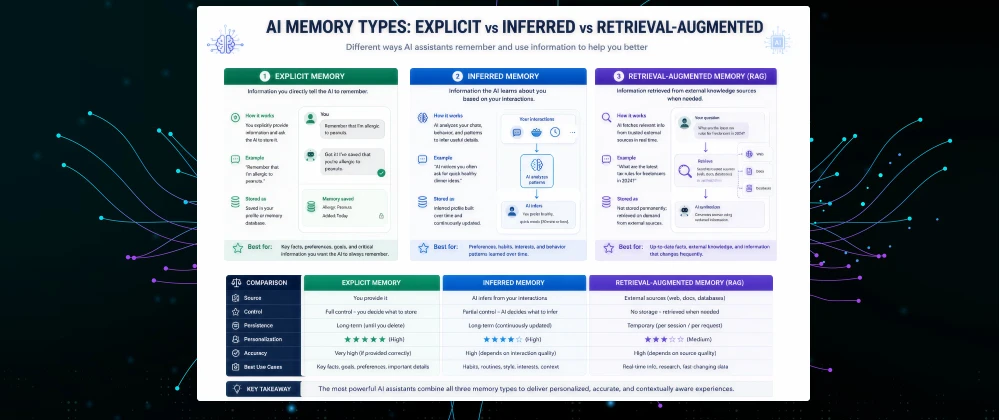
- Start with explicit memory: Tell the assistant directly what to remember (tone, formatting rules, recurring facts) rather than relying only on inference at first.
- Review what's stored periodically: Most providers let you view a list of remembered items — check it monthly and delete anything outdated or incorrect.
- Separate work and personal use where possible: If your assistant supports it, keep professional context and personal context in separate profiles or projects to avoid odd cross-contamination.
Best Tools / Solutions for AI Memory in 2026
ChatGPT (OpenAI)
Offers both explicit "saved memories" and broader inferred personalization drawn from conversation history, with a settings page to view and delete individual entries. Available across the US and EU on paid and free tiers, with some memory features gated to paid plans.
Claude (Anthropic)
Provides memory generated from past conversations that can be reviewed and edited, alongside project-level context that stays scoped to a specific piece of work rather than blending everything together.
Gemini (Google)
Integrates personalization signals from a user's broader Google account activity, in addition to in-app conversation history, which can make it feel more contextually aware but also raises more layered data-source questions for privacy-conscious users.
AI Memory — Comparison Table
Based on our hands-on testing and documentation review described above:
| Category | Explicit Memory | Inferred Memory | Notes |
|---|---|---|---|
| Transparency | Explicit memory is easier for users to audit | ||
| Convenience | Inferred memory requires less manual effort | ||
| Privacy Control | Users directly choose what's stored with explicit memory | ||
| Best For | Privacy-conscious, detail-specific users | Users prioritizing frictionless personalization | Most tools now blend both |
Pros & Cons of AI Memory
✅ Pros
- Saves significant time by eliminating repeated context-setting
- Produces more consistent, personalized output over time
- Supports long-running, multi-session projects
- Most reputable providers now offer view/edit/delete controls
⚠️ Cons
- Can misremember or apply outdated information without clear correction paths
- Raises genuine data-retention and consent questions, especially under GDPR
- Inferred memory can feel invasive if the user doesn't realize how much is being tracked
- Cross-device or cross-account memory syncing isn't yet consistent across providers
Pricing: What AI Memory Costs in the US and Europe
Basic explicit memory is typically included free with most major assistants, but the deeper, cross-session personalization features are often reserved for paid subscription tiers.
| Plan Tier | USD | EUR | GBP |
|---|---|---|---|
| Free Tier (basic memory) | $0/mo | €0/mo | £0/mo |
| Individual Paid Plan | $20/mo | €19/mo | £17/mo |
| Business/Team Plan | $30/mo per seat | €28/mo per seat | £25/mo per seat |
Alternatives to Consider
If built-in assistant memory doesn't fit your workflow, a few alternative approaches exist:
- Manual context documents: Keeping a reusable "context brief" you paste in each session — more effort, but fully transparent and portable between tools.
- Third-party memory layers: Standalone personal knowledge-base tools that some users pair with an assistant to store notes independently of any single provider.
Expert Insights
"Data minimization remains a foundational principle: personal data should be adequate, relevant, and limited to what is necessary for the purposes for which it is processed." — European Data Protection Board, guidance on core GDPR principles
Future Trends: AI Memory Beyond 2026
Expect memory to keep moving toward user-facing controls rather than hidden inference, partly driven by EU AI Act transparency obligations for higher-risk personalization use cases. It's also likely that "portable memory" — the ability to export what an assistant has learned about you and bring it to a different provider — becomes a more common request as users grow wary of vendor lock-in tied to accumulated personalization history.
Overall Rating
Frequently Asked Questions
Real questions US and European readers search for, answered clearly.
Memory Is Becoming the New Baseline, Not the Bonus Feature
A few years ago, an assistant that could hold a coherent conversation felt impressive on its own. That bar has moved. Increasingly, what separates a genuinely useful assistant from a merely capable one is whether it remembers who you are, what you're working on, and how you like things done — without you having to explain it all over again.
That shift brings real trade-offs around privacy and control that are worth taking seriously rather than accepting by default.
At SmartAIHuman.com, we'll keep tracking how memory features evolve across major assistants and what that means for everyday US and EU users trying to get real work done.
Related Articles on SmartAIHuman.com
Sources & External Authority References
- Pew Research Center — "Workplace AI Adoption Survey" (2024). pewresearch.org
- European Data Protection Board — "Guidelines on Core Data Protection Principles" (2023). edpb.europa.eu
- European Commission — "The EU Artificial Intelligence Act" (2024). digital-strategy.ec.europa.eu
SmartAIHuman Editorial Team shares practical AI guides, tool reviews, productivity strategies, and beginner-friendly tech tutorials to help readers use AI effectively in everyday life.